A new way to trial BENOCS Analytics

Blue container with a white cube on the front side

We would like to test BENOCS Analytics tomorrow with our live data. Is that possible?

That’s a question we’ve often heard from interested customers who want to understand how our analytics performs on live network data, not in a generic demo.

Until now, that wasn’t easy to deliver. Our proof-of-concept deployments used the full BENOCS architecture, and while that ensured accurate results, it also meant setup times of six to eight weeks. It also required hardware procurement, exporter configuration, security configuration, and coordination between multiple teams. The outcome was reliable, but the waiting time slowed evaluation and engagement.

Now, that’s changing. We’ve built a new Kubernetes-based trial environment that allows customers to test BENOCS Analytics with their own NetFlow, BGP, SNMP, and DNS data in a standardized environment within two weeks. Each trial runs in a dedicated namespace with its own set of BENOCS pods. Rest assured, each namespace is separated from all other, keeping your data fully within the space of your test environment.

By using Kubernetes pods, BENOCS to keeps the integrity of a full deployment at a smaller scale but considerable reduces time to see results in Analytics. It’s still your data, your network, your insights but available much faster through a smarter and automated setup.

Why we changed the way trials work

Over the past years, BENOCS Analytics has grown into a comprehensive visibility platform used by operators worldwide. But as our deployments matured, we noticed that the proof-of-concept stage became a bottleneck. Customers wanted to explore analytics capabilities sooner, while our team needed to maintain the quality and accuracy of a full deployment. We couldn’t compromise on either.

So, the question became:

How do we make trials faster without compromising on accuracy?

The answer came through containerization and automation. By moving the trial architecture into Kubernetes, we removed the dependency on manually provisioned systems, reduce complexity for the customer and made trials far faster to set up.

How the new trial works

The customer connects their network via an encrypted IPsec connection. Through this all data can be exported directly via the Internet to the trial setup.

  • Flow (Netflow, sflow, IPFIX, etc.) sampled data plane exports for traffic visibility
  • BGP sessions for exporting the FIB (Forward information Base)
    • This also allows for topology information via BGP-LS
  • SNMP/Telemetry for device counters and configuration
  • Cache missDNS data via dnstap used for application tagging and identification

All incoming data flows into our backend structure just like any production environment, which powers BENOCS Analytics. Within a few days of setting up the data feeds, most customers see live analytics in their environment.

The technical foundation: why Kubernetes

Kubernetes gives us the flexibility to create, move, update and decommission trial environments quickly while keeping them isolated and predictable. Each customer trial is effectively a self-contained version of BENOCS Analytics that runs on shared compute but with strict network and data separation.

  • Automation: Kubernetes handles deployment, scaling, and health checks automatically.
  • Consistency: Every trial uses the same container images, infrastructure code, and configuration templates, reducing variability.
  • Resilience: failures on any level can be mitigated fast and automatically
  • Scalability: Extending trails or adding more trails – Kubernetes allows for a lot of flexibility.
  • Efficiency: Shared resources mean lower overhead without sacrificing performance or security.

By combining containerization and infrastructure-as-code, we now spin up customer trials in days instead of weeks with no compromise on security or stability.

What customers need to provide

To start a trial, here’s what we require:

    1. A /29 IPv4 subnet from your Network. These Addresses will be routed via the IPSec tunnel and are assigned to Pods, allowing direct access to the trial infrastructure from your network.
    2. Basic network infrastructure information such as Loopback addresses and Names of the routers the test is run with. Each router will need information from:
      1. iBGP where BENOCS is configured as an rr-client
      2. Netflow/IP source port for sample export
      3. (optional) SNMP/Telemetry information for configuration and status

    NOTE: The trial is limited to certain routers. A full deployment does not need this information anymore as will pick up the entire network via IGP/BGP-LS.

    1. (optional) Export of DNS Cache misses as a dnstap stream

Once these details are shared, our DevOps team uses automated infrastructure code to generate the customer configuration and deploy the stack. When the IPsec tunnel is up and the sufficient data has arrived to draw statisticial conclusion (usually around 48 hours), dashboards start populating automatically.

What we can support

Each trial is designed to balance performance and resource efficiency. As such, trials are limited to:

  • Up to 6 edge routers
  • Up to 50 external peerings
  • Peak traffic depending on the sampling rate
    • 2 Tbps at 1 : 10000
    • 200 Gbps at 1 : 1000
    • 20 Gbps at 1 : 100
  • Flow volume target under 2 MByte/s or 16MBit/sec
  • 60 days of historical data

This ensures consistency across customers while keeping the experience close to production quality.

The road ahead

The Kubernetes trial program is now ready for onboarding. Our goal is to make it effortless for you to experience BENOCS Analytics in a fast, secure, and reliable environment.

If your team has been curious about BENOCS but waiting for the right window to try it, that window just opened. Reach out to sales@benocs.com or any one of the BENOCS team to get started.

A revamped interface dimension in BENOCS Analytics

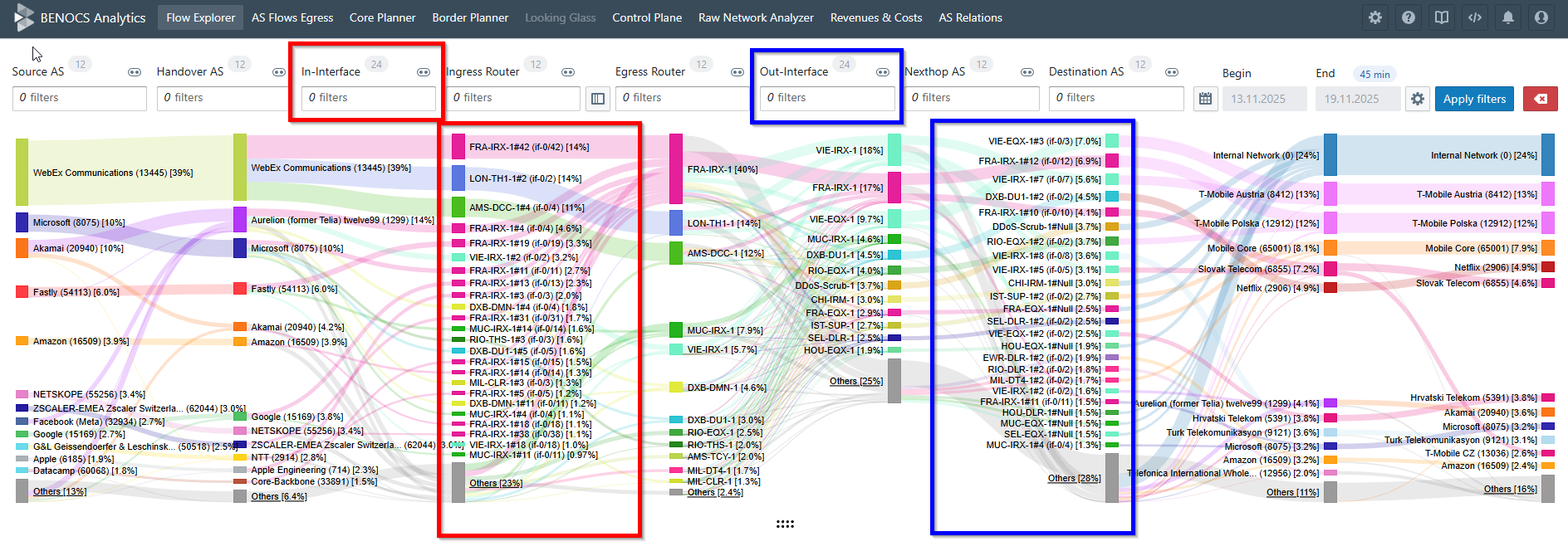
Detailed interface layout of BENOCS Analytics, showcasing various dimensions and data connections with color-coded sections.

BENOCS Analytics shows where a flow leaves a network on a router (Egress Router dimension) and peer (Nexthop AS dimension) level mainly from BGP information. Our customers kept asking for one thing:

Can we filter by the exact interface and see traffic flows?

Yes, now you can!

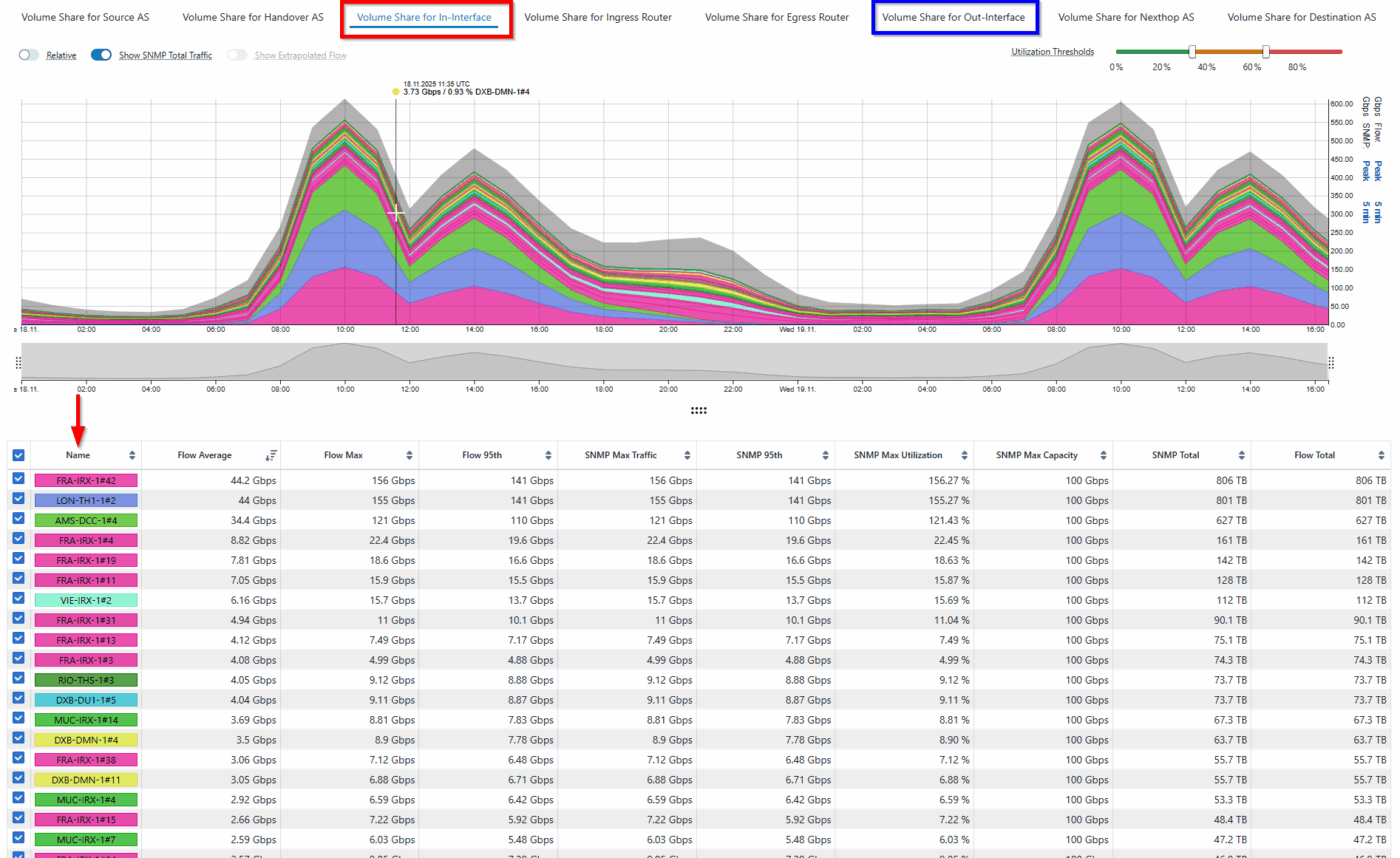
Our new interface dimension lets you see both in-interface and out-interface per flow automatically, so you don’t have to trace packets manually.

This post covers why it matters, what has changed, and how BENOCS’ new interface dimension works.

Why it matters

In many networks, bundled/aggregated links create a neat and easy 1 Interface ↔ 1 Nexthop AS mapping. From Egress Router and Nexthop AS, you can often deduce the interface, but that’s not always the case. Take for example:

  • Multiple parallel (non-bundled) routes to the same Nexthop AS: You want to know which link carried the flow, mainly for capacity planning, traffic engineering and troubleshooting .
  • IXP scenarios: Several Nexthop AS values may share the same physical interface. You still want to see the exact interface that is used.

In these cases, the exact in-interface and out-interface makes a difference.

With this new feature you can:

  • Perform per router, per peer, per interface traffic checks.
  • Compare loads across parallel routes.
  • Trace a spike to a single ingress port.
  • Give peering and capacity teams clean evidence.
  • Help first-line NOC cut guesswork.
Line graph displaying volume shares for various interfaces in BENOCS Analytics, with data tables below.

What exactly has changed?

There is a whole new interface dimension in Flow Explorer!

You can now:

  • Filter by router, interface or the peer connected to it
  • See the interface name (e.g. AE 1.0) and index (e.g. 139)
  • View both in-interface and out-interfaces of ingress and egress routers
  • Hover over a particular interface to see the interface description
  • Use autocomplete to find ports fast

This is part of the overall BENOCS Flow Analytics improvement. It is free for all our customers and users!

Interface description is now live in Border Planner, and soon support will be extended to Raw Network Analyzer (RNA).

How it works

  1. Open presets and pick interface level
  2. Filter by either router or peer and deep dive into different interfaces.
  3. Hover over any interface to see description, name and index.
  4. Switch between in-interface and out-interface dimension above time series to focus on the volume share and all info in the statistics table.
  5. Additionally, interface description support has been extended to Border Planner too.
  6. In Border Planner, right-click and choose “Show ingress in Flow Explorer” to filter the specific interface.

What we need from you (clean data tips)

  • Enable flow export on core-facing interfaces (ingress) that feed your egress routers.
  • Verify router/interface metadata (labels, names) are consistent so that reports look the way you expect.
  • Contact your BENOCS representative to turn on Interface dimension and validate if everything looks right in your Analytics dashboard.

Frequently asked questions

Is this a paid add on?

No, it’s completely free.

Where else will I see it?

Interface descriptions are live in Border Planner. Support will be extended to RNA

Will it work for IXPs?

Yes, when multiple nexthop AS values share the same physical interface (common at IXPs), the feature reports the actual interface used.

Pricing that scales with your network; not your hardware or headcount

Colorful chart displaying network traffic flow through various dimensions and communications providers

Why it matters

The networks of ISPs change frequently: new peers are added, fresh POPs are built, migration to new hardware is undertaken, and more. Ever changing networks sometimes brings changes to the teams too like NOC shifts, peering, security and capacity planning. A network observability tool is integral to network operations to monitor and make sure traffic is flowing uninterrupted, irrespective of the changes. If the pricing of the solution changes per flow, per router, per peer or per user, then it turns normal engineering work into budget surprises and access bottlenecks.

That is why we at BENOCS adopted an alternative approach to pricing: one service fee aligned to your committed peak traffic levels, a nominal traffic fee only when traffic levels grow beyond that commitment, and, last but not least, unlimited user licenses for your organization. Another added bonus: your favourite sampling rate does not affect the price.

Cool, huh?

How do we determine pricing?

We provide customized pricing for each network and the pricing is determined by the complexity of your network. We collect the following network KPIs to evaluate network complexity.

  • Peak throughput traffic on the network: The peak traffic that traverses your network. Any bit counts only once; no double-counting for ingress and egress
  • Number of full BGP table routers that export flow: usually the internet-facing border or edge routers
  • Total number of routers: Including all your access- and aggregation routers
  • Number of BGP peers: includes all the upstreams, downstreams, peers, caches, CDNs, and IXPs (we consider private peers separately, while an IXP will be counted as one peer) connected to your network.

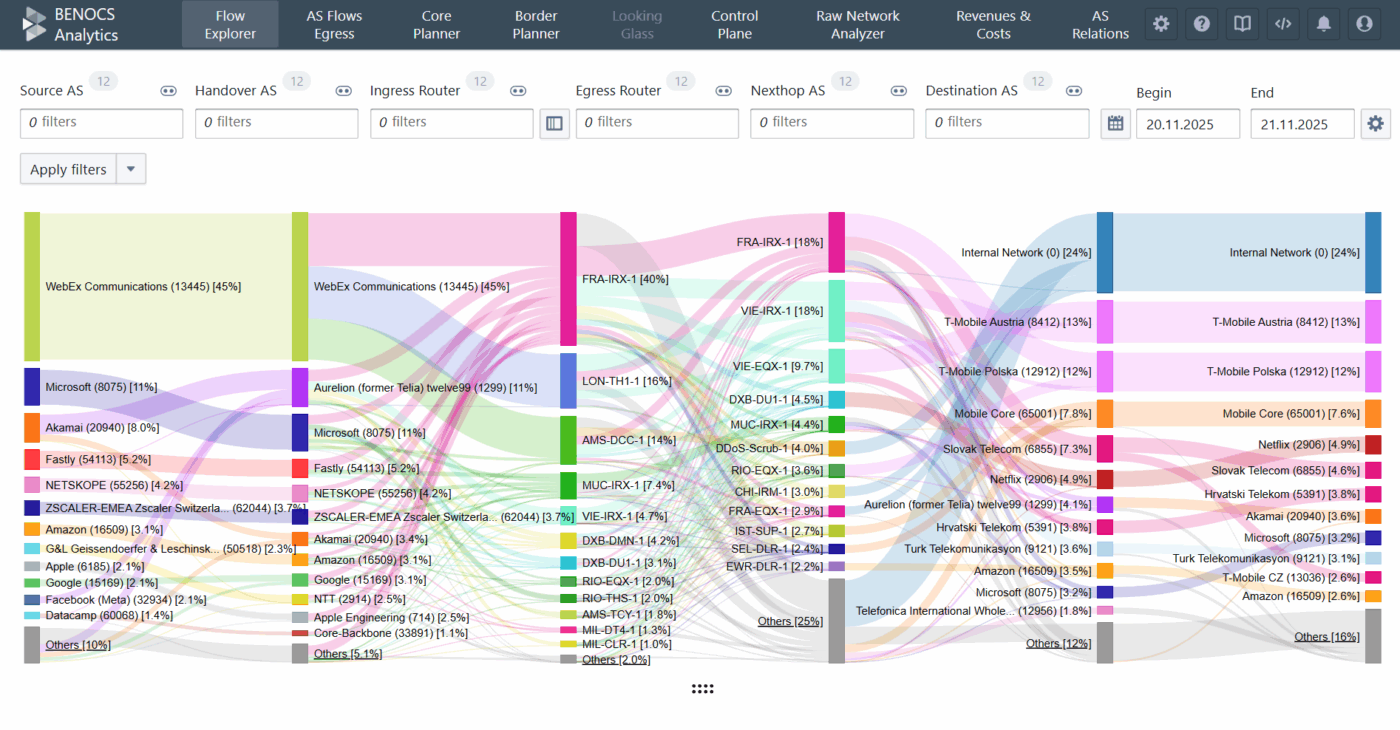
Now you might wonder: how does this help us calculate network complexity? Each KPI above constitutes a dimension in our post-processed data and allow us to calculate the number of unique flows in your network. We measure traffic on the incoming side of the ingress interface on your full-table BGP router. This router could either be an edge router facing the internet or a customer-facing router. These routers are displayed in the Ingress Router dimension in the Sankey diagram of our Flow Explorer.

BGP provides us with the complete AS path of the traffic and that AS path also includes the IP address of the router from which traffic egresses (even if they don’t export flow). These routers are the total number of routers in the network and are displayed in the Egress Router dimension of the Sankey.

On either side of Ingress and Egress Router dimensions, we display both Handover and Nexthop ASes which comprise BGP-peers (usually Transit, PNIs, Peerings, CDNs and caches) and downstream networks.

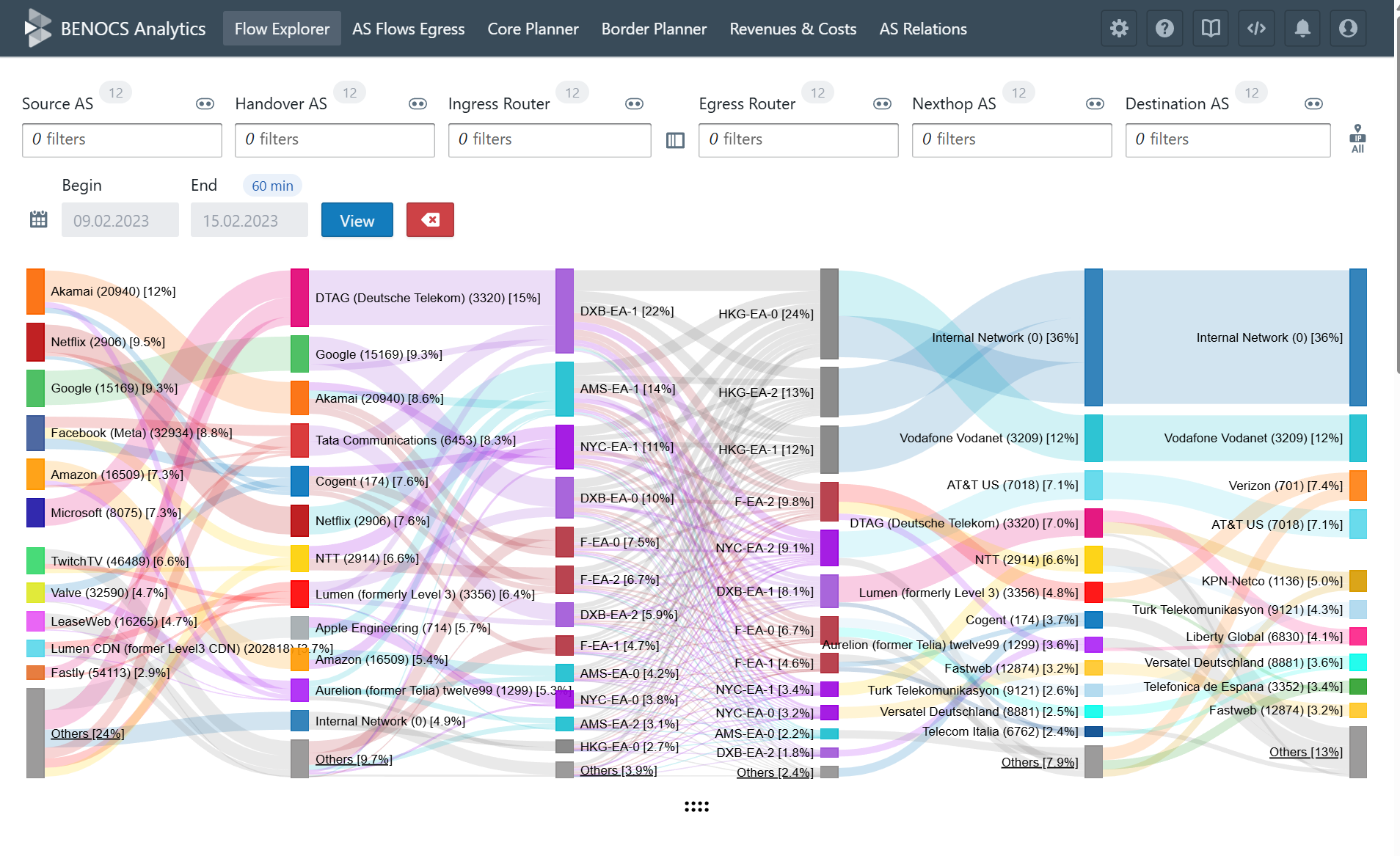
When you combine these dimensions with Source ASes sending traffic to your network and Destination ASes, where traffic terminates after leaving your network, the 6-dimensional Sankey is complete.

Colorful flow diagram showing network connections and data between various entities
6-Dimensional source to destination visibility

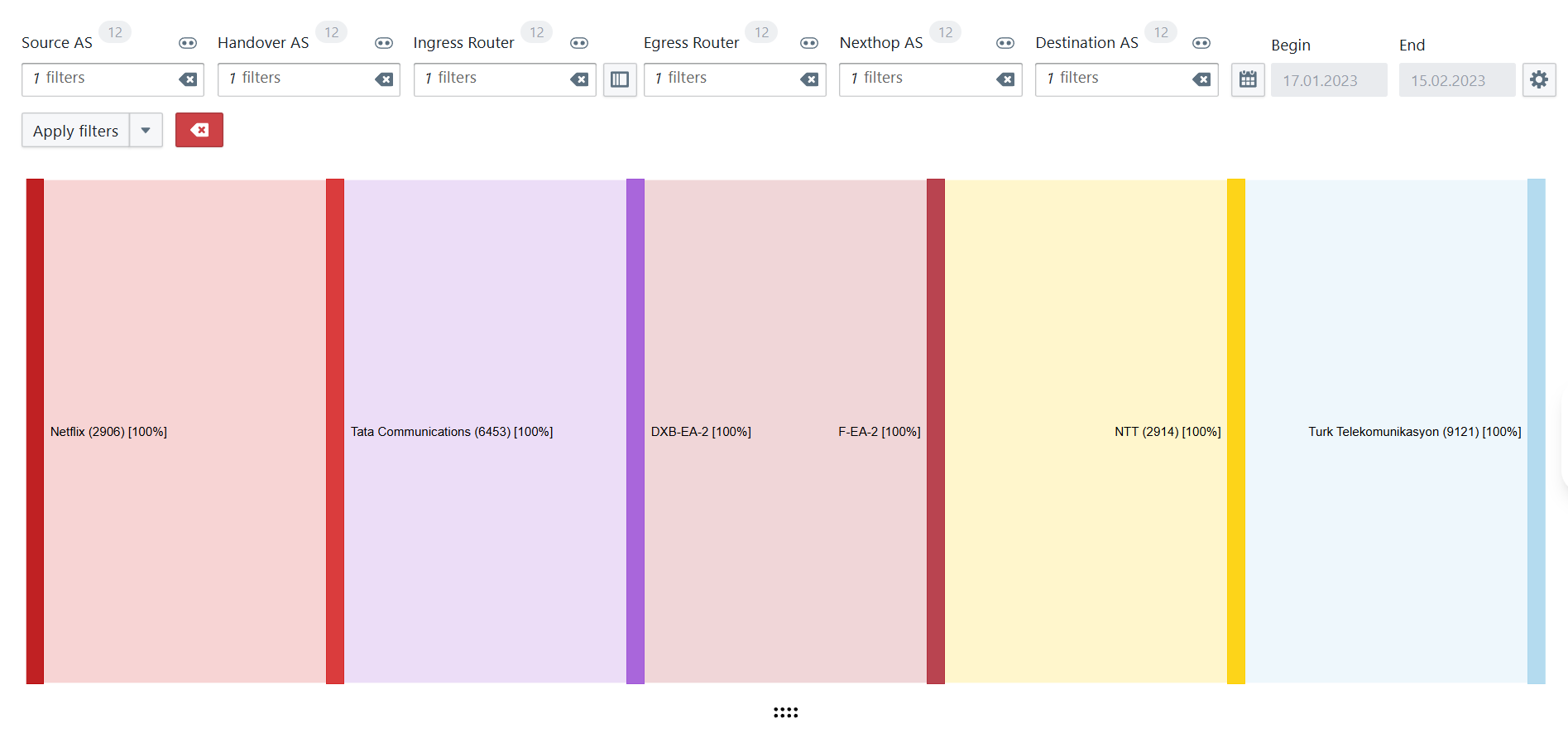
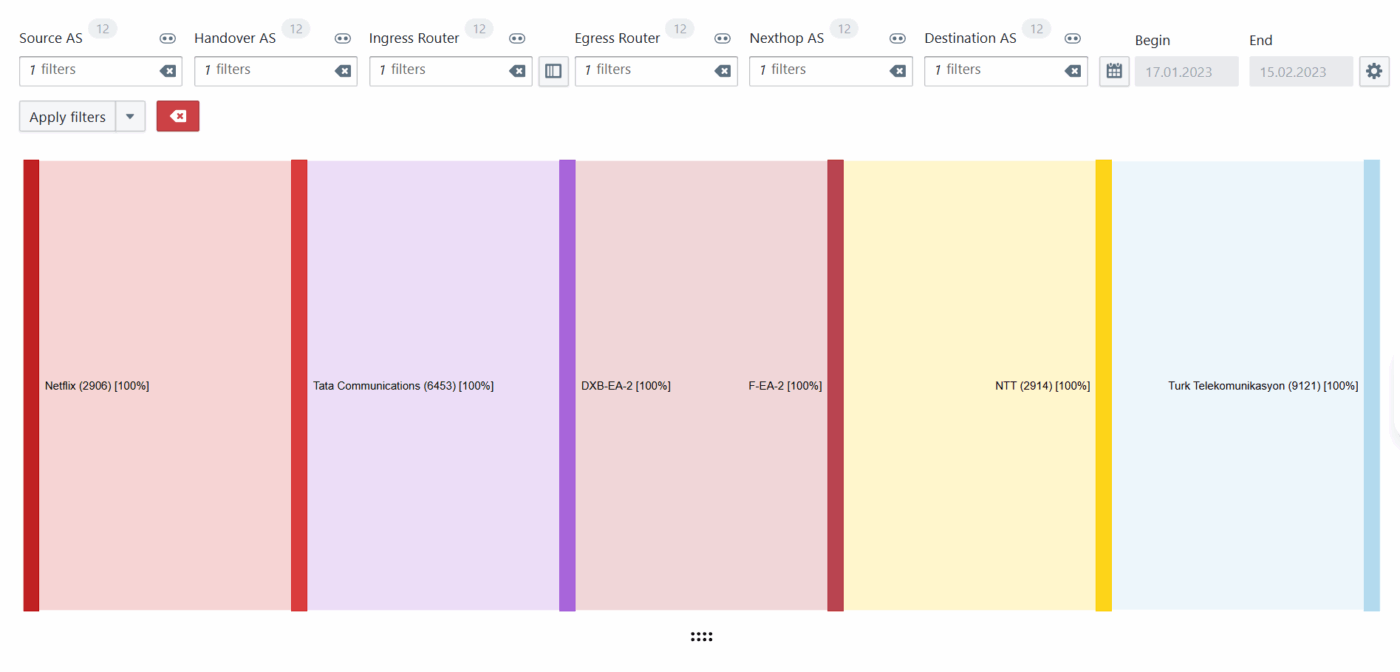
Now the goal is to find number of unique flows and it can be best explained with an example. Using filters across different dimensions, you are able to see below a path of Netflix traffic entering via Tata as Handover and terminating into Turk Telekom via NTT.

Colorful chart displaying network traffic flow through various dimensions and communications providers
Unique flow explained

Similarly, we are able to calculate the total number of unique flows in each network and add that to the peak traffic levels to determine complexity. Once the complexity is determined, a service fee is now provided for a peak traffic commit. Traffic fee appears on the invoice only if sustained peaks exceed the traffic commitment, because higher sustained peaks generate more flow records to ingest, enrich and store, that means: more data to process and analyze. This fee simply covers that incremental processing load when utilization genuinely grows.

Why this suits ISPs’ economics (and operations)

  • No growth tax on topology: You can add any number of new peers or redundant routers, but the pricing doesn’t jump if utilization doesn’t.
  • No gatekeeping on access: Unlimited licenses mean NOC, engineering, peering, security and management executives can all see single source of information. Billing follows utilization, not headcount.
  • Predictable budgets: The primary variable to plan is your network’s traffic. Only sustained growth triggers a small, clear traffic fee.

What you will and won’t see on a BENOCS invoice

  • Service fee: aligned to the peak traffic you commit to
  • Traffic fee (only if applicable): nominal, contract-defined, when sustained traffic peaks grow beyond the commitment.
  • Absent by design: per-router, per-peer, per-user license add-ons.

Here's an example:

You commit to 1.4 Tbps of peak traffic at the start of the contract and add two new routers in two different PoPs for resilience. If peaks stay at 1.4 Tbps, your invoice doesn’t change. If peaks sustainably move to 1.55 Tbps, you will see a small transparent traffic fee. We will recommend lifting the commitment at renewal if that level persists.

Do you want an estimate of our Analytics solution for your network?

Reach out to us at sales@benocs.com for a customized quote.

Why Geo-IP data can mislead you and what to use instead

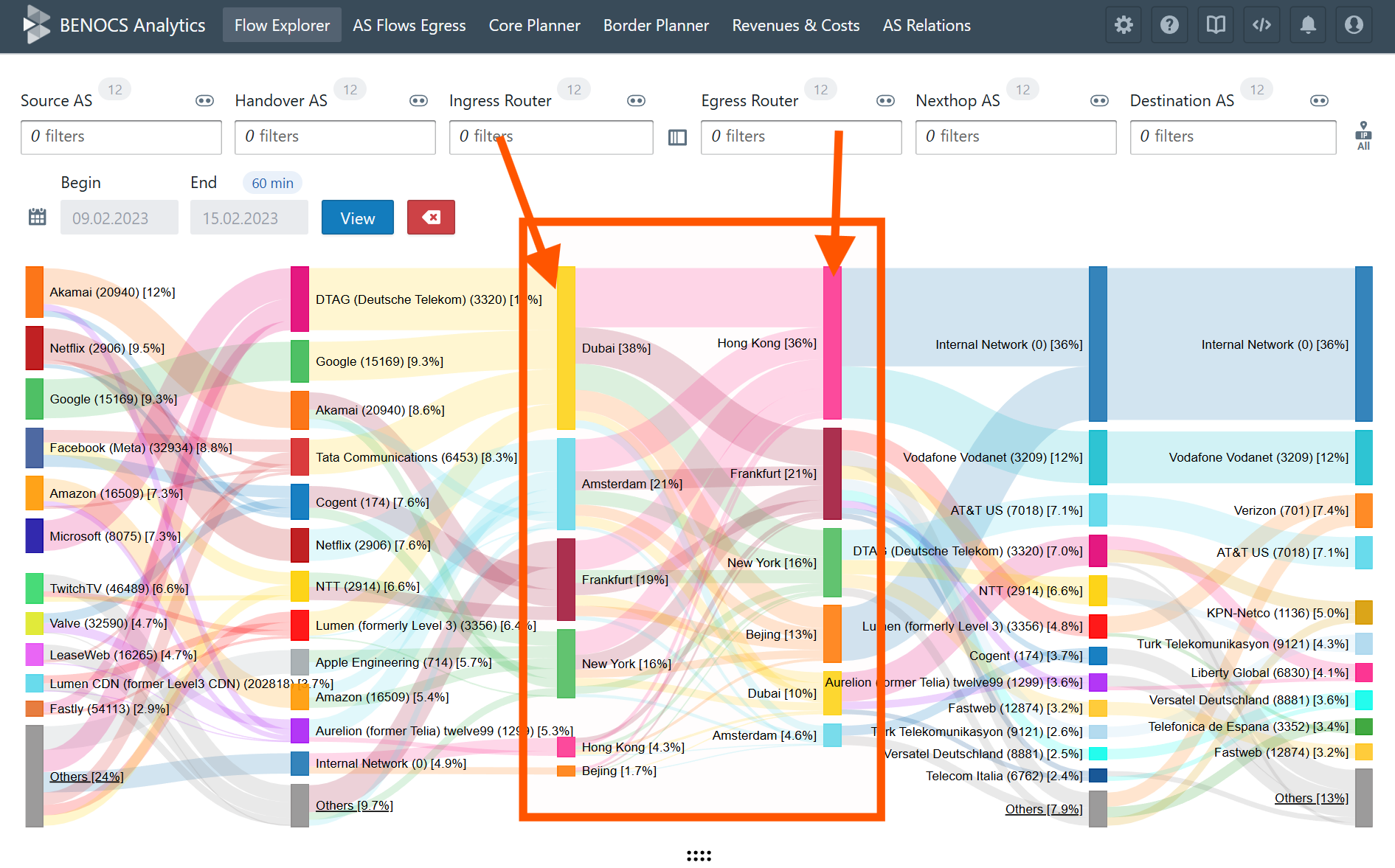
Screenshot of BENOCS Analytics Sankey diagram showing rouer locations

What is a Geo-IP database?

Ever wondered where your network traffic is sourcing from or going to? Many network operators today rely on Geo-IP databases to answer these questions. A geo-IP database is a collection of data that links IP addresses to their corresponding geographic locations. Geo-IP databases usually provide information such as country, region, city, ZIP code, latitude, longitude and sometimes more specific details such as ISP name and also the type of connection (either a DSL or Mobile).

There are several Geo-IP databases available such as MaxmindIP2Location, IPgeolocationIPinfo, Netacuity etc. There is a significant difference of accuracy of a commercial database compared to a free version since the features and the updates that come with it vary greatly depending on the version type.

How is IP to location mapping done?

IP to location mapping is a continuous, multi-source data enrichment process that leverages a combination of methods and data sources to assign geographic identities to IP address ranges. Some of the sources are as follows:

  1. Internet Service Provider (ISP) assignment – ISPs allocate IP addresses to users based on service areas. When an ISP assigns a range of IPs in a specific region, those IPs are mapped to that location in the geolocation database.
  2. Public registry records – Regional Internet Registries (RIRs), such as RIPE NCC, APNIC & LACNIC, maintain records of IP address allocations. These records usually identify which ISPs have been assigned specific IP blocks, often including their registered addresses.
  3. Network routing & topology –  Physical internet infrastructure and routing information help estimate locations. Data about how networks route traffic (such as trace routes) can tell where an IP is likely hosted.
  4. Data mining and user contributions – Some databases leverage information from websites when users voluntarily provide location data e.g. during account registration. This user-input is then associated with their IP addresses for added accuracy.
  5. Active geolocation techniques  Pinging an IP from multiple servers worldwide and using the response times to estimate the user’s physical location. This technique is known as multilateration and this improves accuracy to the city or postal code for some addresses.

When do you use a Geo-IP database?

Geo-IP databases are widely used for web analytics or targeted content/ads. The next time you use a Starbucks W-Fi and get an ad for a store that you just walked past, don’t be surprised. In the telecommunications world, network operators generally use Geo-IP location to optimize and manage their network. Some of the widely known use cases are:

  1. Traffic routing & load balancing Geo-IP data helps direct user traffic through the most efficient or regionally relevant routers and infrastructure, reducing latency and improving service quality.
  2. Capacity planning Understanding where users are densely concentrated enables ISPs to allocate resources, plan infrastructure upgrades and optimize peerings in regions with high demand.
  3. Anomaly detection Rapidly identifying access from unexpected geographies can flag potentially fraudulent account activity or security breaches.
  4. DDoS detection & mitigation Geo-IP can filter or block malicious traffic from specific countries or regions reducing spam and DDoS attacks.
  5. Regulatory compliance ISPs can enforce region-based policies and also fulfil legal obligations regarding customer data storage and access based on end-users’ location.

Limitations of Geo-IP databases

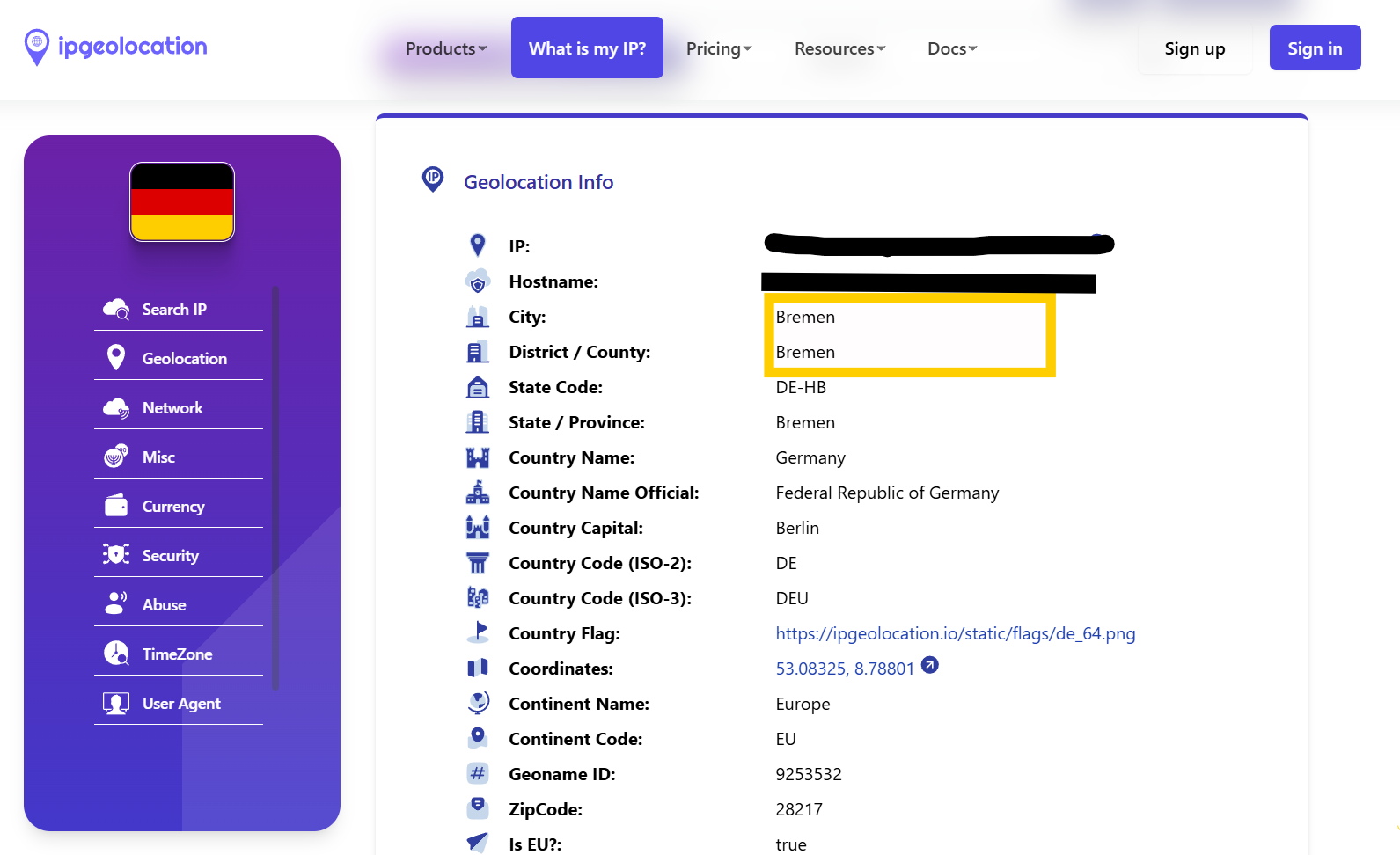
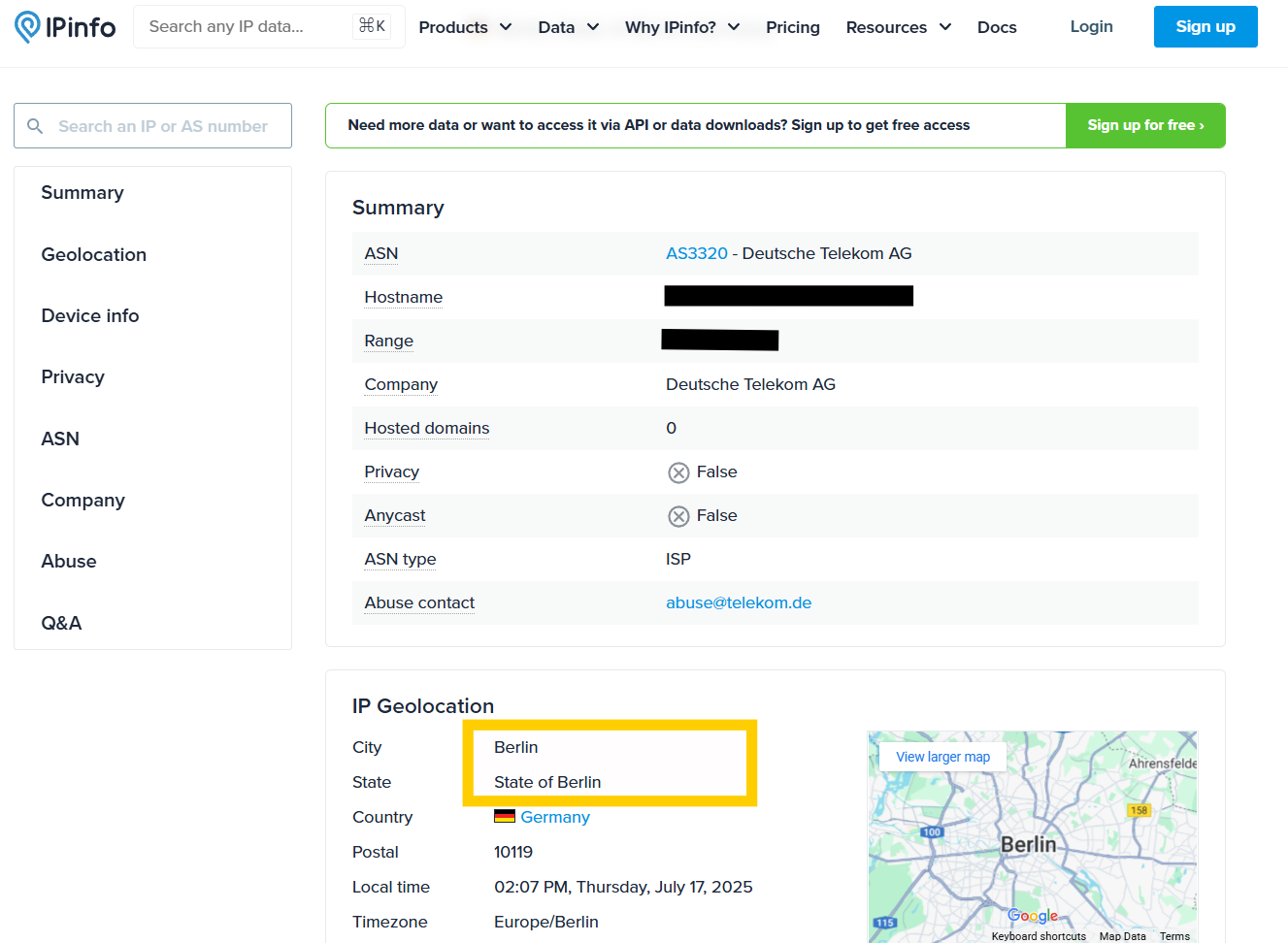
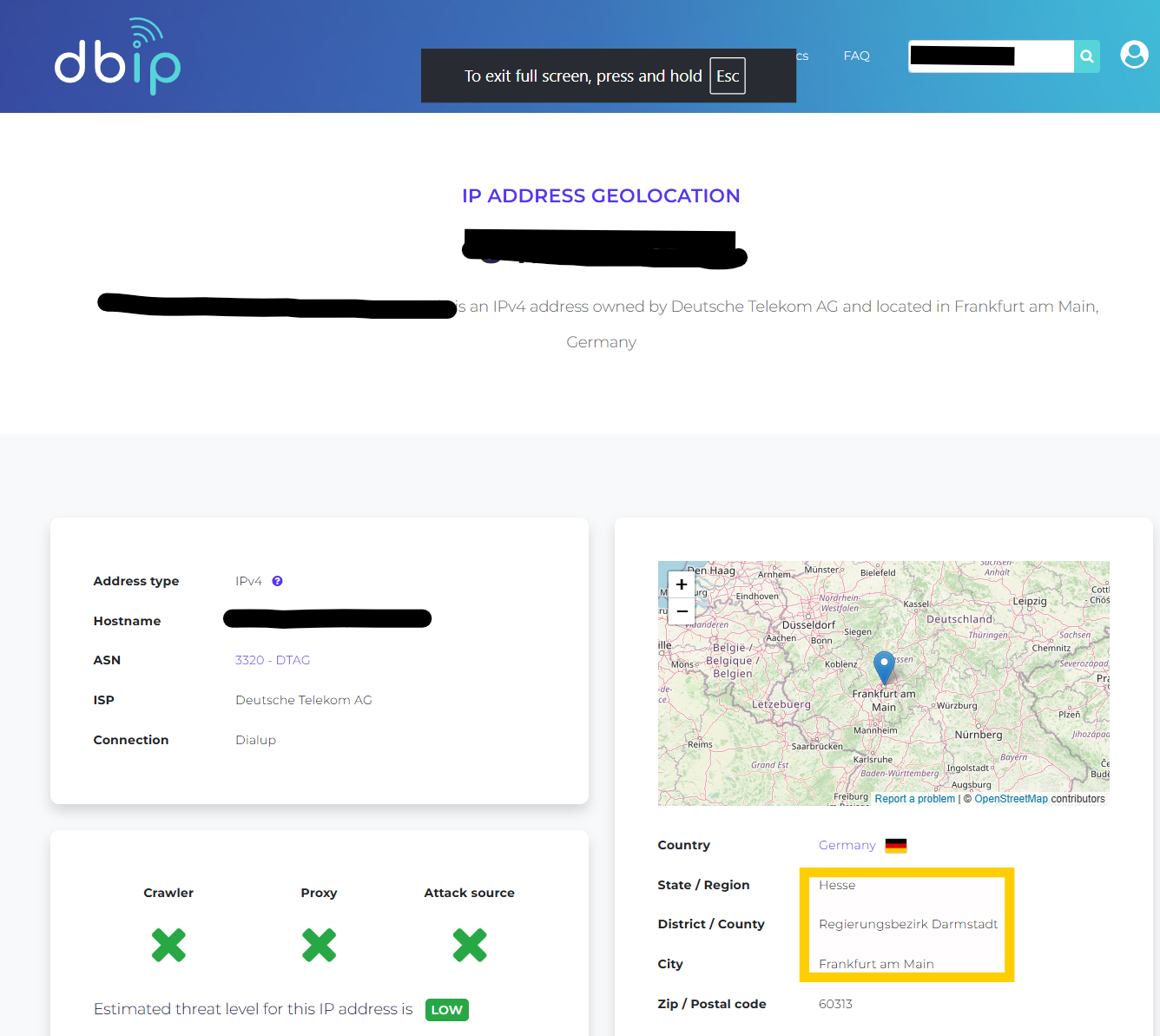
Let’s take the first use case – traffic routing – and look at it more closely. Geo-IP databases work reasonably well when identifying where user traffic originates from and are reliable for country-level detection and broad regional insights. However, some operators also use these databases to correlate flow data with the physical location of subnets within their own network to determine where a specific customer’s traffic is coming from. While operators typically already know where their infrastructure and customer allocations are located based on internal records, that information often lives in separate static inventories that aren’t easily integrated into flow analysis tools. As a result, they turn to Geo-IP data to fill that gap. The problem? Although the accuracy is typically high (90-99%) for country level, it drops down significantly to 43%1 for city level detection. Precision is usually better in large, urbanized areas but considerably worse in small towns or rural regions, and the databases may revert to the nearest major city sometimes missing suburbs or towns. We decided to do a small comparison of our own to run a Berlin IP address lookup on some of these databases to test the accuracy, and the results are striking.

Screenshot of ipgeolocation website
ipgeolocation predicts that the IP is from Bremen some 400km away from Berlin
Screenshot of the ipinfo website
ipinfo is the most accurate of all predicting Berlin and almost the correct district too
Screenshot from the website dbip
dbip predicted the same IP to be from Frankfurt, 550km from Berlin

There are many factors contributing to the inaccuracies. Cellular networks and mobile IPs often have much lower localization accuracy compared to broadband or Wi-Fi. Errors of tens or even hundreds of kilometers2 are common for mobile users. Secondly, the usage of VPN, proxies, carrier grade NAT and very recently Apple Private Relay further obscures the true location, resulting in greater inaccuracies. From our experience in analyzing data from 25+ networks, we often see the same IP block being used across multiple regions or cities because of the frequent change in network topologies, which results in IP block reassignment. The external databases can become outdated quite quickly and the reliability is questionable unless updates are more frequent. Lastly, the privacy regulations may restrict access to certain information, impacting the completeness or refresh rate of data, especially in strict jurisdictions. This makes it risky to rely on Geo-IP for regional-level insights, especially when misclassification can lead to wrong decisions about peering, routing, or capacity planning.

A better alternative: ingress-egress router-based geo-location

Specifically for the routing- and capacity-planning usecases, BENOCS Analytics takes a fundamentally different approach than relying on external Geo-IP databases: we use what your network actually sees.

BENOCS collects and cross-correlates data from standardized network protocols, including BGP, Flow, SNMP, IGP, and DNS, directly from the operator’s infrastructure. Leveraging our proprietary data-processing engine, we visualize this information in an intuitive multi-dimensional Sankey diagram, with up to twelve traffic dimensions, including but not limited to Source, Handover, Ingress, Egress, Nexthop, and Destination dimensions.

Screenshot from the BENOCS website showing the Sankey diagram
Six-dimensional view of the internet traffic ingressing and egressing an operator's network

This visualization allows you to trace the full journey of a packet, from where the traffic is sourcing from (Source AS) to where it terminates (Destination AS) – all grounded in your actual routing and flow data, not approximations.

Flow data is collected at the ingress interface of all internet-facing edge routers. When combined with BGP information, we can infer the forwarding path, including the corresponding egress routers, both of which are displayed within the Sankey’s respective dimensions.

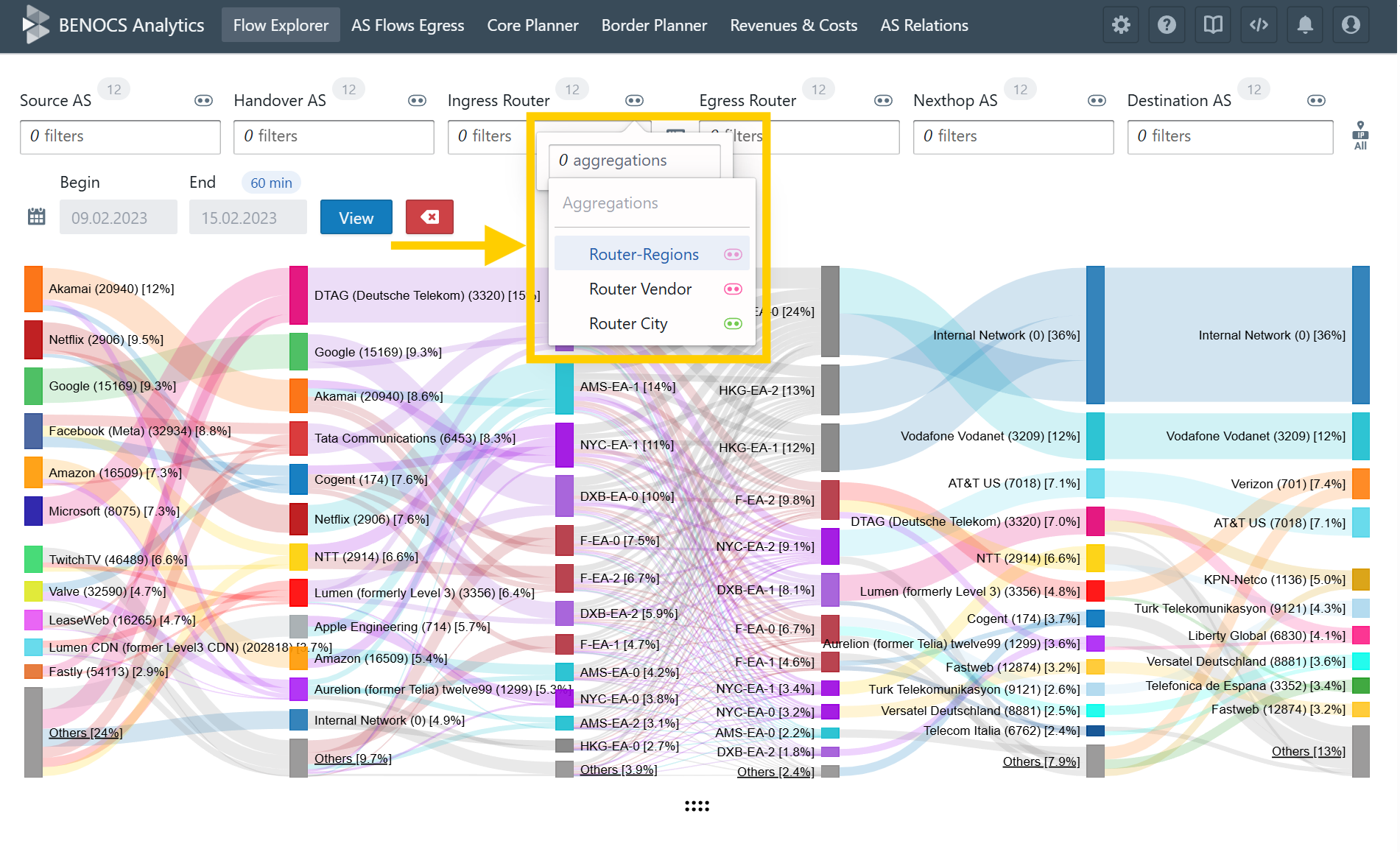
To take it even further, BENOCS enables you to tag and group these routers by city, country, region, or custom groupings, making traffic analysis geographically meaningful and accurate.

Screenshot from BENOCS Analytics showing the Taggin & Grouping feature
Grouping ingress routers by city, region, or vendor

This gives you a precise and actionable view of traffic exchange between locations in your network. You’re not relying on a third-party’s guess: you’re seeing real, topologically and geographically grounded data from your own routers. Why settle for outdated or inaccurate geolocation databases when your network already holds the truth? And also, the geo-location of an IP might be very different than the location of your egress-router, which is the last point your network sees this packet.

Screenshot of BENOCS Analytics Sankey diagram showing rouer locations

When accuracy matters, trust your network

Geo-IP databases offer a convenient, quick-glance view of where traffic might be coming from, and for many applications, that’s good enough. But when you’re a network operator responsible for making high-stakes decisions about traffic engineering, capacity planning, or routing optimization, “good enough” simply isn’t.

As we’ve seen, Geo-IP data can be outdated, inaccurate at city-level, and increasingly unreliable due to VPNs, mobile networks, and evolving topologies. It’s a blunt tool for what should be a precise task.

At BENOCS, we believe that your network already contains the most reliable source of truth. By analyzing real-time BGP, Flow, and IGP data directly from your own routers, we empower you to see not just where your traffic might be coming from but where it actually enters and exits your infrastructure. With this ground-truth visibility, you gain clarity, confidence, and control over your network’s geographic traffic flows – no guesswork required.

So the next time you’re questioning where your traffic comes from, don’t ask a third-party database. Ask your network. It knows.

References:

  1. Should we trust the geolocation databases to geolocate routers- https://blog.apnic.net/2017/11/03/trust-geolocation-databases-geolocate-routers/
  2. Location accuracy of commercial IP address Geolocation Databases- https://itc.ktu.lt/index.php/ITC/article/view/14451

Why your flow data might be lying to you (and how to fix it)

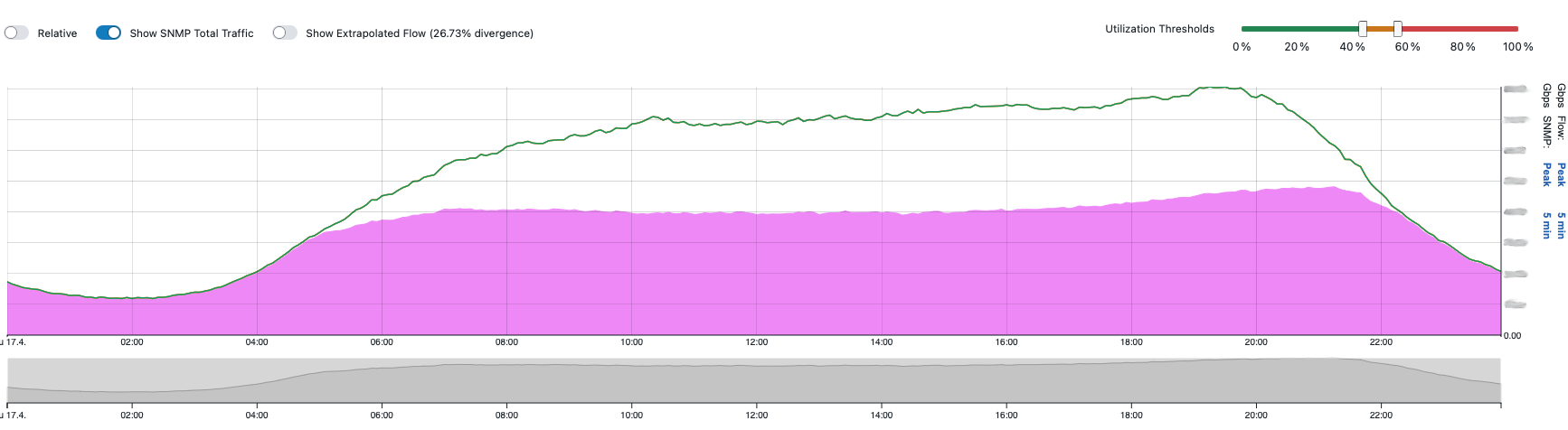
A graph showing a discrepancy between the flow data (pink) and the green SNMP line

In theory, flow data should give us a nice, accurate view of what’s happening in our network. In reality, there’s a big elephant in the room: you never really know if the data you’re getting is complete. Flow exports are typically sent using UDP, and that means there are no guarantees. If a packet doesn’t make it to your collector – too bad, it’s gone.

For people who depend on flow data for analytics, capacity planning, security, and troubleshooting, that’s not just annoying; it’s dangerous. And most of the time, neither the user nor the collector has a way to detect if something’s missing.

Where the flow can fail

We often hear: “Well, if my collector drops packets, I’ll know about it.” True – most collectors can log packet loss. And while the network in between could theoretically drop packets, in our experience, that’s rarely the bottleneck.

The real troublemaker? The exporter. That’s the router or switch generating the flows in the first place.

If the exporter silently drops flow data due to an internal issue, like a full buffer, nobody notices. Not the user. Not the collector. You just end up working with incomplete data, drawing the wrong conclusions, and maybe even alarming or scaling unnecessarily. The worst part? This often happens gradually as traffic grows, long after the initial configuration was done.

The good news: it’s fixable

There are specific configuration parameters you can tweak to make flow exports more reliable and insightful. Here’s what matters most:

1. Sampling rate

This defines how many packets the router skips before recording one. A lower number means better accuracy.

  • 1:1000 is a solid recommendation from us. It balances visibility into smaller flows with the router’s resource limits. With this, you can spot flows down to 1 Mbps or even less.
  • A 1:1 sampling rate (every packet counted) gives you perfect insight, but comes with a cost: your router needs more memory. And guess what happens if the buffer overflows? Yep – data loss.

2. Inactive timeout

This defines how long the exporter waits without seeing new packets for a flow before it sends it out. We recommend 15 seconds. It keeps the buffers clean and prevents long-hanging flows from clogging up the memory.

2. Active timeout

This is the maximum duration a flow is kept “open” before being sent, even if new packets keep arriving.

If your analytics work in 5-minute buckets, this is crucial. If you use the vendor default (often 1800 seconds or more!), flows will straddle multiple buckets and make your data messy. We recommend 60 seconds to ensure clean aggregation.

How to check for flow generation failures

Most major vendors give you tools to see if you’re dropping flow records at the source:

  • Nokia: show router flow-export statistics
  • Juniper: show services flow-monitoring statistics
  • Cisco: show flow exporter statistics
  • Huawei: display netstream statistics export

Check these regularly, especially if traffic volume has changed recently.

Recommended config summary

Parameter Recommended value Why it matters
Sampling rate 1:1000 Balanced accuracy and router performance
Inactive timeout 15 seconds Flush idle flows quickly to free buffer
Active timeout 60 seconds Clean 5-minute time buckets, avoid overflow

Vendor config quirks

Each vendor has their own flavor of config:

  • Nokia: Look for sampling, active-timeout, inactive-timeout under flow-export
  • Juniper: Uses flow-monitoring and export-profile definitions
  • Cisco: Classic NetFlow or Flexible NetFlow; keep an eye on buffer size
  • Huawei: NetStream config; especially check active/inactive timeouts

Always validate configs against your version’s documentation.

Avoid redundant sampling

If you’re sampling on both ingress and egress interfaces, you’re doing double the work (and seeing double the data!). We recommend ingress-only. It’s the earliest point you can capture a flow, and it prevents duplication.

Ditch the default

Default configurations are not your friend. They are built for generic scenarios and not optimized for the accurate, actionable analytics we all depend on.

Take the time to check, tweak, and validate your exporter configuration. The benefits will ripple through the whole system: from better performance monitoring to more accurate security insights.

How monitoring tools can lead you astray (and why BENOCS won’t)

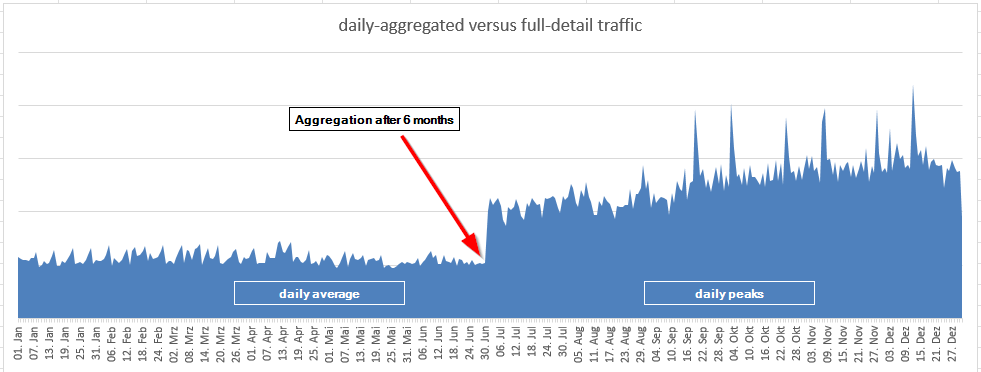
A graph showing the difference between daily average values and daily traffic peaks

When monitoring your network traffic, you rely on tools to provide precise, actionable data. But what if some tools “lie” – not out of malice, but due to hidden methodologies that mask the truth? Let’s uncover how certain practices can lead to inaccurate traffic analyses.

The pitfall of long time periods, or how bucket size influences data analysis

A common discrepancy arises from how monitoring tools handle data over extended time periods. In order to be analysed, data first needs to be divided into buckets: the volume of traffic flowing through a network, measured in bytes, is collected in groups in order to process it. A bucket size is determined by time, so the size of the bucket is the amount of time in which the traffic data was collected, e.g. 5 minutes, 60 minutes, 24 hours, etc. Generally speaking, the smaller the bucket size, the more accurate the data analysis possible, for reasons which will follow.

Many tools use larger bucket sizes for long-term queries, which aggregate data into broader averages. For example, data might be processed on a daily basis (24 hours). While this might simplify storage and traffic visualization, it often leads to inaccurate, lower traffic values, masking critical peaks and underestimating actual usage. In other words, traffic peaks that would otherwise have been visible are averaged out, leading to smaller average values. 

This perceived accuracy can result in:

  • Bad forecasting of capacity needs: Decisions based on underestimated traffic values can lead to insufficient resources, causing bottlenecks during peak times.
  • Missed critical events: Outages or traffic shifts that create temporary spikes might be hidden, leading to incomplete analyses.
Overcoming these challenges: how BENOCS tells you the whole story

At BENOCS, we’ve designed our system to ensure you always have a clear and accurate picture of your network traffic. Here’s how we address these issues:

  1. User-centric design: We work closely with users to understand their requirements. Long-term queries are often used for capacity management, where maximum utilization is critical. Additionally, in cases of outages, the traffic shifts must also reflect the maximum traffic seen during such events. As a result, BENOCS Analytics shows by default what the user expects: the maximum peak of any given day.
  2. Transparency: BENOCS displays the bucket size and aggregation method directly in the time series. 
  3. You’re in the driver’s seat: We give users full control to adjust the parameters of their network’s traffic collection to suit their specific needs at any particular time. In our close collaboration with our users, we have seen use cases for various aggregation methods, so are dedicated to giving our users the ability to easily adapt their chosen parameters on the fly.
The BENOCS advantage

We want to bring network analytics to everybody – from network engineers to marketing teams. For this reason, we identified the most expected behavior of these graphs as crucial default behavior. At the same time, we ensure transparency by displaying how these values are derived, leaving no room for guesswork, and enable our users to make adjustments to these default settings if necessary. This ensures that BENOCS users:

  1. see what they expect to see,
  2. understand what BENOCS did, and
  3. can customize as needed.

By combining intuitive defaults, transparency, and flexibility, BENOCS delivers the tools you need for accurate and actionable insights into your network.

Interested in a demo? Let us know!

Towards application identification with a novel DNS-based approach

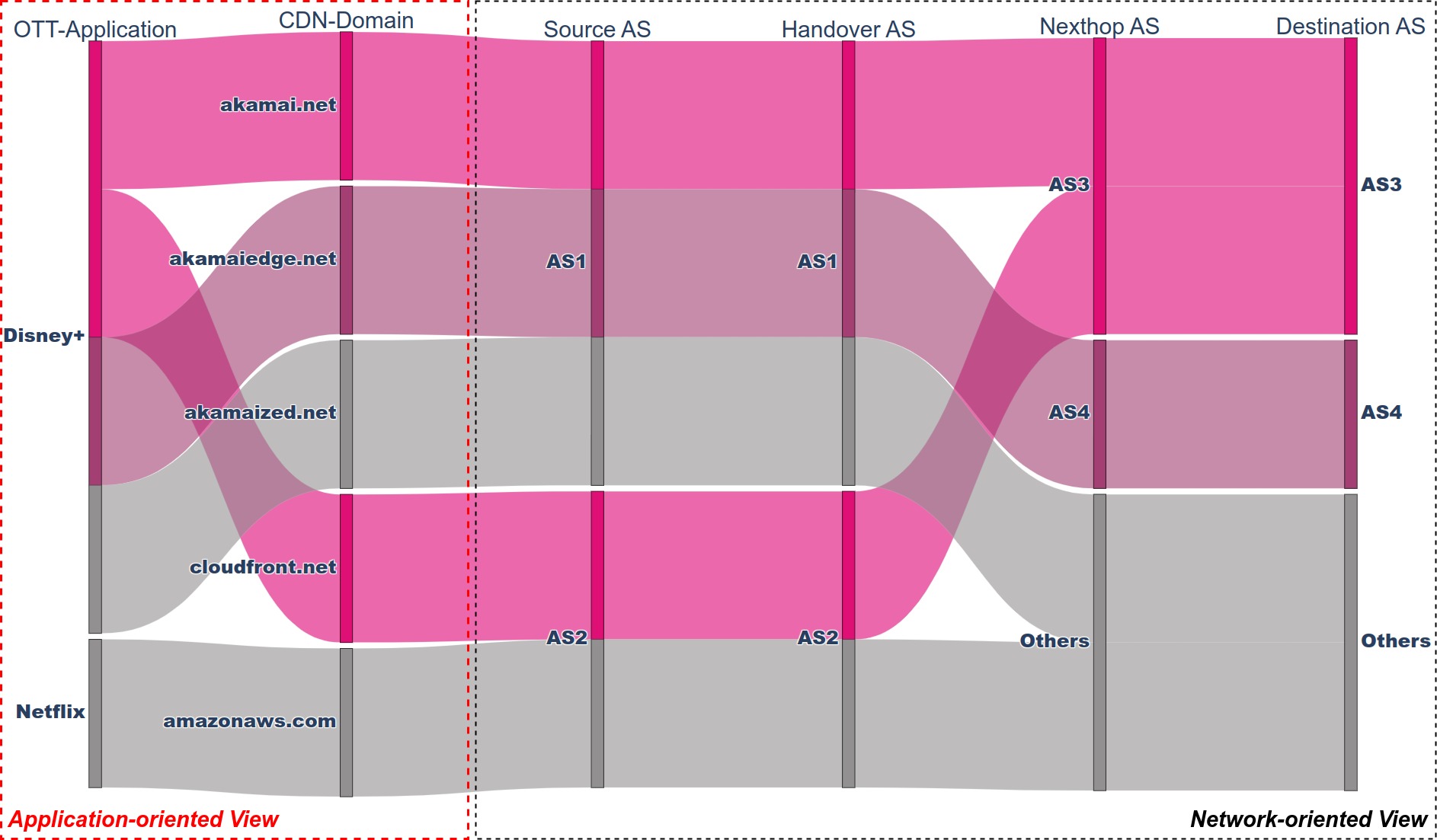
Application-oriented view of traffic sources in the form of a sankey diagram

Today’s internet revolves more around applications and less around networks. An interesting example of this current application-oriented approach is a global outage this year[1]. Nobody remembers that AS13414 reported a down, however, many people remember that X (formerly Twitter) had slowdowns and outages affecting many international users.

In this context, network players (e.g., ISPs) have been trying for decades to understand how application traffic is delivered to end-users. Existing tools are limited and only DPI (Deep Packet Inspection) has been the dominant technology to provide such insight; however, this faces increasing challenges with encryption and scaling.

In this post, we present a BENOCS implementation of a DNS-based correlation framework, called DNS Flow Analyzer (DFA), to annotate and classify the traffic flows with information about applications (e.g., TikTok, Disney+, AmazonPrime, DAZN) and CDN domains (e.g., fastly.net, akamai.net, cloudfront.net). This novel solution allows network providers to expand their traditional network-oriented view with an application-oriented view.

A network-oriented view is not enough

A few decades ago, content providers were building big data centers to serve different Internet-based applications to end-users. In recent years, however, Content Delivery Networks (CDNs) are being used to convey the increasing demands for online applications (including video, gaming, and social networks). These media contents, riding on the top of the network, are known as Over-The-Top applications (OTT-Applications) and they use globally distributed CDNs for sending their content. Currently, large content providers leverage more than one CDN and CDNs also convey traffic of multiple OTT-Applications.

In order to work efficiently, network operators need better knowledge on how traffic from the CDNs and OTT-Applications is delivered to their end-users. However, they have historically focused on obtaining information only about Autonomous Systems (ASes), transit providers, and peers. This network-oriented approach is not enough to answer one key question: how do OTT-Applications use the different CDN domains to distribute their traffic?

An application-oriented approach with DFA

Answering the above question has been a daunting task for network actors. Existing network-focused solutions such as legacy flow tools or DPI are limited in tying traffic information to individual applications. The latter also becomes increasingly inefficient due to encryption and requires a ridiculous amount of hardware, especially working on a large scale.

At BENOCS, we have developed a methodology that includes the analysis, design, and implementation of an application identification system called DNS Flow Analyzer (DFA). DFA annotates and extends the traffic flows with domain name information, so that two new layers are effectively obtained: (i) OTT-Application domain and (ii) CDN domain.

Specifically, we propose a large-scale real-time network data correlation system that uses a set of different data sources (e.g. Netflow, BGP) but mainly it feeds on DNS streams to obtain multi-dimensional traffic information. As a result, we obtain an application-oriented view to identify how a source OTT-Application (e.g. Disney+) is delivering traffic to a network using different CDN domains (e.g., akamai.net, cloudfront.net).

DFA architecture and workflow

The high-level DFA architecture and entire workflow rely on two developed components:

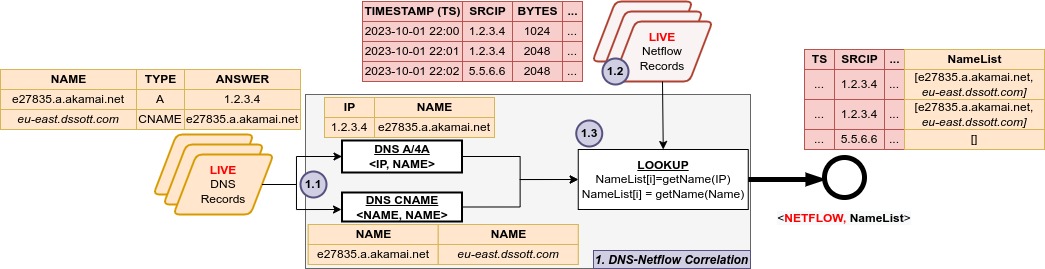
  1. DNS-Netflow Correlation. The output of this component includes extended and correlated data: Netflow and a list of URLs representing a DNS domain name resolution. The sequence of events are:

1.1) Live DNS records are classified in two lists (i) DNS A/4A to map an IP address to a domain name, and (ii) DNS CNAME to map a domain name to another domain name.

1.2) In parallel, live Netflow records are captured at the network ingress interfaces. Each Netflow record contains, among others, timestamp, srcIP, dstIP, bytes, etc.

1.3) DFA looks for the srcIP of a Netflow record in the DNS A/4A list to find the domain name it corresponds to (using getName(IP)). Then, looking at the DNS CNAME list, DFA searches for the previous domain name to find the CNAME it corresponds to (using getName(Name)). The search in the CNAME list continues until no further domain names are found (or a pre-defined loop limit is reached).

Diagram of DFA architecture
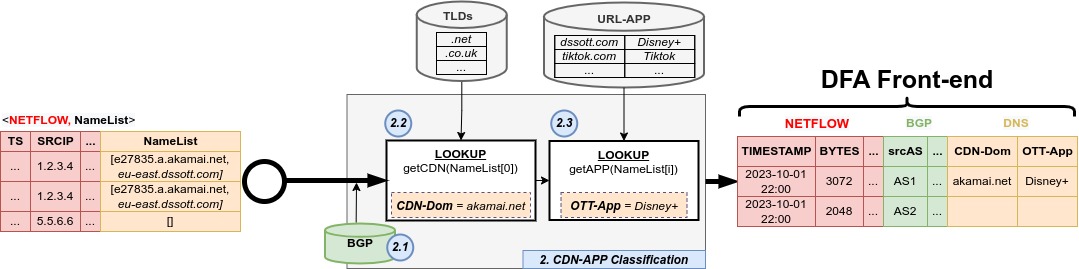
  1. CDN-APP Classification. This final output extends the traffic flows with CDN domain and OTT-Application information (including BGP). See the sequence of events below:

2.1) DNS-Netflow data is correlated with BGP to gain more knowledge about the traffic paths (source AS, handover AS, nexthop AS, and destination AS).

2.2) Regarding the CDN domain, getCDN() function uses the first URL in the list of domain names and selects the second-level domain (2LD) and top-level domain (TLD). In case of the latter, this component makes use of the Public Suffix List (PSL) database[2] published by Mozilla.

2.3) This second lookup goes through the list of domain names to obtain an OTT-Application. The getAPP() function uses a URL-APP database to associate a specific domain name or URL to the OTT-Application it belongs to (e.g., dssott.com is for Disney+, pv-cdn.net is for AmazonPrime, etc.). This URL-APP is a customized/curated list that continually evolves as new sources are discovered.

DFA architecture to front end (diagram)

DFA correlates flow and DNS data to see where the network traffic originates. It identifies CDN domains and OTT-Applications within the source AS based on DNS A/CNAME records pairing. This novel and future-proof way to identify applications can be typically used by:

  • Firstline maintenance (NOC) to respond to customer complaints, which are generally about applications, not IP-addresses or ASes.
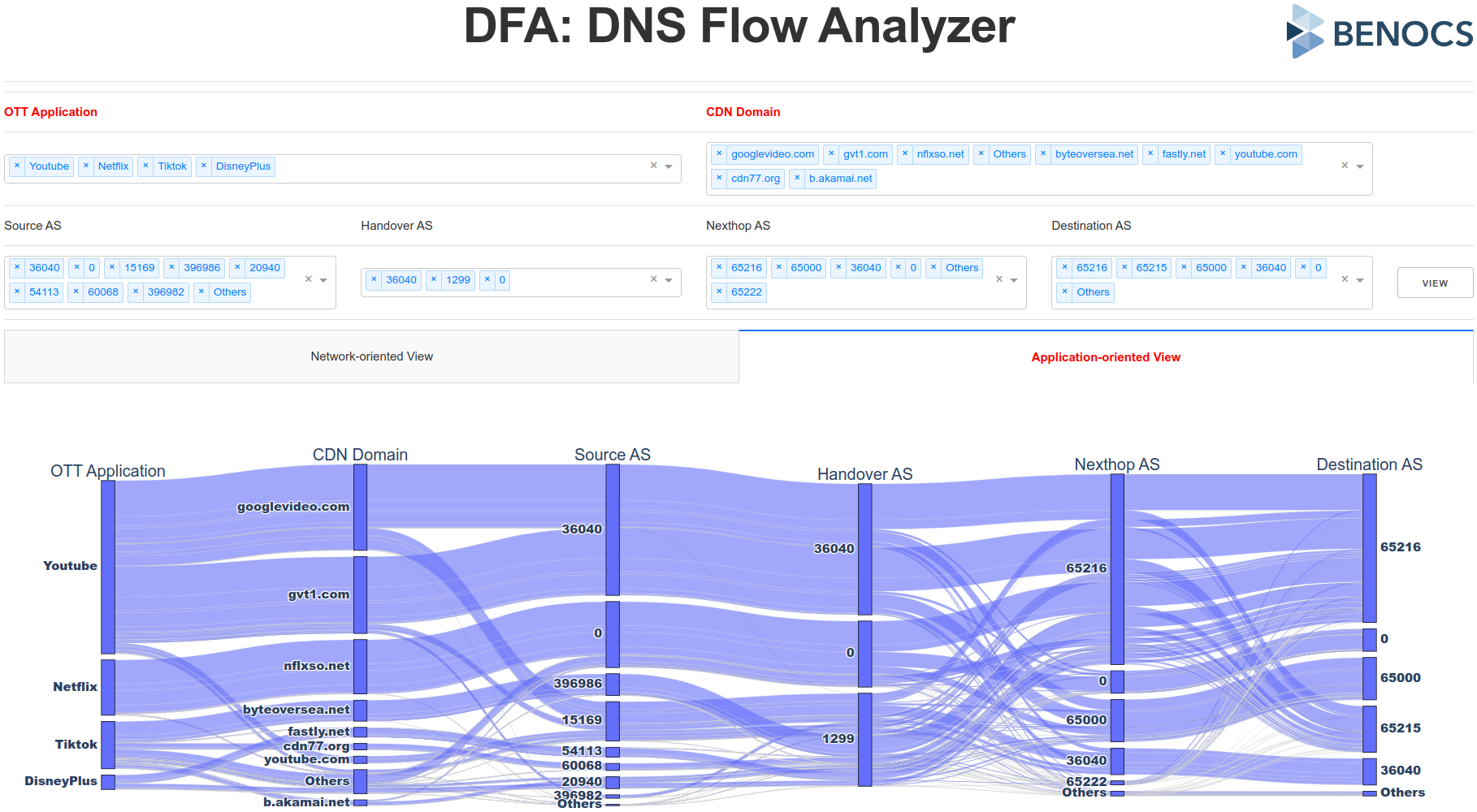
  • DFA also includes an easy-to-understand multi-dimensional dashboard with a network-oriented view (by default), having the option to unlock two new dimensions to allow the visualization of the traffic flows in an application-oriented view with various OTT-Applications and CDN domains.
Screenshot BENOCS DNS Flow Analyzer

Get in touch with us if you’d like to learn more about DNS Flow Analyzer and see it in action!

[1] https://twitter.com/TwitterSupport/status/1632792942262747136

[2] https://publicsuffix.org/

Happy birthday, BENOCS!

BENOCS 10 years logo

It’s time to celebrate! BENOCS turns 10 years old in June. We spoke to BENOCS CTO and co-founder Ingmar Poese to learn about the early days and his experiences since co-founding the company back in 2013.

How did BENOCS come about?

Believe it or not, it was kind of an accident. At the time I was doing research at T-Labs for my PhD and they were looking for ideas for founding a company. Me & Oliver Holschke came with an idea for a business to serve large telco operators. He took care of the business side of things, while I did the  technical stuff (I didn’t know much about business – and frankly. I’m still not really interested in that part).

The project was then in limbo for a year; we weren’t sure if it would take off at all. Then, in 2013, we got the go-ahead, and it was then that the company was founded conceptually. Back then the name ‘Berlin Networks Engineering’ (BNE), what we wanted to call the company, was already taken, so we couldn’t use it.

We wanted something with “Berlin” in the title, so we looked thought the available web domains for something that started with “BE”. We came across “BENOCS” and thought it sounded good.

What was the first BENOCS product and how did it look?

The product was “invisible”; it simply looked cryptic and mathematical. It was originally an ISP-CDN collaboration tool and was active in the backend only. It was designed as completely transparent, not to be seen. Kind of like IP addresses: they exist and but generally no-one thinks about them, they just work.

However, there was one crucial issue: to get enough ISPs, you need a critical mass of CDNs, and vise versa. Today we still have this product and it’s called Flow Director. I still think it has huge potential in the market. Because it’s hard to see, though, it’s hard to sell.

Incidentally, BENOCS Flow Analytics was also an accident, which happened while we were developing Flow Director. So that’s something.

What have you learned in the past 10 years about the telco industry and business in general?

The first lesson I learned about the industry is also the biggest: telcos move slowly. It’s incredibly hard to convince them of new ideas, especially for a product as close to the core as ours, which makes it  almost impossible to deploy in new networks. When it does work out, though, it’s extremely rewarding for both parties. I like working with large, complex systems, and you don’t get much larger than telcos.

Regarding business in general, I’ve learned one needs to be persistent. Because you can never make each and every customer 100% happy all the time, it’s often necessary to make compromises, finding the thing that works best for the majority. Then you can build out and develop the product further from there. This requires persistence and keeping your eye on the bigger goal.

Thirdly, I learned a few interesting things about going from academia into industry. Some see you “giving up” on research. Others decide you’ve not yet gained enough industry experience. You’re stuck between a rock and a hard place; it’s a tough place to be in. For me, research still the biggest inspiration for my work.

Ingmar Poese, CTO & co-founder of BENOCS

And what have you learned about yourself?

I’ve come to realize just how much I dislike bureaucracy. Having processes in place for the sake of processes sucks. I’ve learnt that not writing code is something I don’t enjoy and unfortunately, I do a lot more of it, i.e. not writing code, than I would prefer. I’m constantly learning soft skills: my people skills have come a long way, but I’m still working on them.

And I’ve learned that if don’t stop myself, I work too much.

How do you ensure your team works healthily?

I encourage healthy working hours. I try not to contact people outside of regular working hours, unless for work-related emergencies, I try to avoid too short deadlines. That said, I also expect everyone in my team to take responsibility for themselves. If you work too much or too little, you need to tell me, so we can sort it out.

As a company we generally want to keep our employees happy and healthy. After all, our team is the secret to making the best products for the telco industry: without them, we cease to exist.

What would you do differently if you started BENOCS today, in 2023?

Building our software would be a very different process today. The technology of 2023 is different; there are many tools now available that didn’t exist 10 years ago. As a result, some technical decisions could today be made differently.

I wouldn’t do much differently regarding the team itself and building up the business. A negative experience with someone in the team at the very beginning taught me that even if a position waits longer to be filled, that is better than hiring the wrong person to do the job. As I already mentioned: each member of our team plays an integral part in keeping BENOCS running smoothly and successfully. We are very conscious of whom we take on board and whether they are the right fit for the company. We are definitely doing something right: we have a fantastic team and I am grateful that they also chose us.

The next 10 years are going to be awesome.

Anomaly detection done right

Screenshot of an Anodot anomaly alert and next to it a screenshot of the corresponding incident in BENOCS Flow Analytics

Network visibility is our specialty: We can show you things about your internet traffic that you never knew. By utilizing various internet protocols such as IGP, BGP, SNMP, NetFlow and DNS, BENOCS Flow Analytics already helps you and your company – among other things – improve peering negotiations, prospect new customers, improve capacity planning and, of course, improve customer service.

You’ll forgive me the 1980’s infomercial reference, but here it comes:

But wait, there’s more!

Recently we teamed up with AI champs Anodot to give our customers even more insights into their network traffic.

You might be familiar with the following scenario: You sign up for notifications to alert you of important incidents affecting your network.  You set manual thresholds, outside of which the alarm bells start ringing: Here! Something important needs your immediate attention!

So, you quickly check the situation. False alarm.

Soon after, the next alert lands in your inbox: This time it’s worked. Thank goodness for alerts!

Then another alert comes in. And another. More false alarms.

Suddenly you are inundated with alerts, only a small proportion of which are useful. As a result, you generally don’t even bother much with them, deleting them with little more than a brief scan.

Problem solved

Anodot uses artificial intelligence and machine learning to learn normal traffic patterns, detect and correlate anomalies, and create real-time alerts based on deviations from normal network traffic. This approach eliminates the problem of alert “noise”, that is, being spammed by alerts that shouldn’t be alerts in the first place.

Thanks to the integration of Anodot’s autonomous monitoring into BENOCS, one click in your email alert will send you straight to the relevant event in Flow Analytics, where you can study the issue in your network and remediate failures before they impact revenues.

Download the white paper to dive deeper into the combined Anodot and BENOCS anomaly detection solution and get in touch with us if you’d like to know more.

Fast Indexing for Data Streams

Screenshot of the sankey diagram in BENOCS Flow Analytics

Our customers, some belonging to the biggest telecommunications providers in the world, need to monitor and analyze huge amounts of traffic. For this reason, Flow Analytics needs a substantial databank behind it. There is no shortage of database management systems on the market, which means we had to do a lot of testing, before deciding on which one would make BENOCS Flow Analytics work.

While the internet is home to massive amounts of data, this data is not static, but rather hurtling through cyberspace like William Shatner on a rocket joyride into space. And there’s not just one William Shatner taking a 10-minute trip: There are countless data transfers happening all the time. This movement means we need to factor in another dimension: time. BENOCS Flow Analytics users need to investigate incidents that occurred in specific time frames, making fast access to specific time ranges while ignoring the rest of the data a basic requirement.

To visualize network traffic in this way we need to measure traffic volume over time, showing the user how the data is behaving on its journey from its origin to its final destination.

Self-healing push architecture

Analyzing network traffic at high complexity and speeds is challenging, especially in diverse environments with asynchronous data feeds. However, we love a challenge and this is the setup that BENOCS operates and has to deal with. Across different network setups, BENOCS unifies the data sources and correlates the incoming network information.

At BENOCS, we process and correlate data feeds of dozens of terabytes each day. The data processing is built around data becoming available from different sources, then being pushed through several jobs. This essentially becomes a data push architecture that processes data as it becomes available.

In the above scenario, three data feeds are producing three results that are of different data types. Furthermore, each of the individual feeds has its own time resolution as well as delay when the data should be available – however, sometimes it’s late. In the case of data being late, processing should not stop, but rather skip the late pieces until they become available. Once available, they must be made available as well.

So why ClickHouse?

At BENOCS, we chose to build this architecture with ClickHouse at its core for several reasons. In summary, those are fast indexing and fuzzy matching on data streams.

BENOCS ClickHouse Pipeline

Let’s consider result 2 as an example. This can only be processed when Feeds A/C have data. However, it is possible to partially process data in case data from Feed A is missing. In numbers this means if Feed A has data for 10 5-minute timestamps for a specific hour ready and Feed C has a matching timestamp for that same hour, at least two of the four timestamps in result 2 can be calculated. The other two timestamps need to wait until Feed A makes the data for it available.

ClickHouse solves this problem for BENOCS by fast lookups on the time dimension. By running DISTINCT SELECT queries on the primary indexing column, terabytes of data can be searched through in a matter of seconds. This makes the operation of checking the data availability light-weight despite the heavy data burden.

However, searching through the timestamps and finding gaps efficiently is not all. The same principle also applies for the actual data processing correlation. ClickHouse’s ability to skip data based on time makes the table sizes become almost irrelevant, as it can zoom in on the needed data efficiently. This makes the processing time for a single time range independent of the actual table size as well as the position in the data. This ClickHouse mechanism allows BENOCS to run efficient self-healing data streams in the face of unreliable data streams.

Fast indexing

Fast indexing is the most important reason BENOCS heavily utilizes ClickHouse. It boils down to ClickHouse offering extremely fast lookups on specific dimensions due to its MergeTree table design. ClickHouse allows for skipping vast amounts of data in a matter of seconds based on the primary key without having to consider the data in irrelevant data at all.

For BENOCS, this dimension is time. In the ClickHouse pipeline we run, lookups based upon time are the first step towards any job being scheduled.

Fuzzy matching

When dealing with different time scales, joining tables usually means unifying the matching columns to have exact matches. However, when dealing with vastly different timescales (see Feed B/C), this becomes highly complicated as FEED B might have multiple different matches for one key in Feed C. Furthermore, other dimensions complicate things due to missing/incomplete data.

This is where the ASOF join of ClickHouse comes to the rescue for BENOCS. This means being able to find the nearest match instead of the exact match using a join. Combined with well selected WHERE clauses this becomes a powerful feature that expediates and simplifies queries massively.

Summary

BENOCS processes vast amounts of data in ClickHouse, utilizing its powerful engine. The ability to zero in on the needed data and being able to ignore irrelevant data lets BENOCS build a self-healing data pipeline that can handle unreliable and volatile data feeds into a stable analysis for its customers.

If you’re a telco provider wanting to optimize your network traffic, drop us a line and register for a free Demolytics account to see BENOCS Flow Analytics in action.

This blog post originally appeared on clickhouse.com.